Custom Triggers & Buttons
NanoLog natively includes a floating trigger button that users can click to open your widget. However, you might want to integrate NanoLog into your existing application UI, like a dedicated "What's New" button in your navbar or sidebar.
This is fully supported! You can hide the default trigger and programmatically open the widget using our global API.
Hiding the Default Trigger
To hide the default floating action button, you can override its CSS using the ::part() pseudo-element selector. Add the following to your application's global CSS file:
nanolog-widget::part(trigger-btn) {
  display: none !important;
}
This ensures that the default button is completely hidden from your users.
Programmatically Triggering the Widget
Once the widget is initialized via window.NanoLog.init(config), you can programmatically open, close, or toggle the widget from anywhere in your application.
We expose the following global methods:
window.NanoLog.toggle(): Opens the widget if it's closed, or closes it if it's open.window.NanoLog.open(): Explicitly opens the widget.window.NanoLog.close(): Explicitly closes the widget.
Example: A Custom Button
Here is a simple example of a custom HTML button that triggers the NanoLog widget when clicked:
<button onclick="window.NanoLog.toggle()" class="my-custom-btn">
  What's New
</button>
Example: React / Next.js
If you are using React or Next.js, you can trigger it from a component's onClick handler:
export default function Navbar() {
  return (
    <nav>
      {/* Your other navbar items */}
      <button
        onClick={() => {
          if (window.NanoLog) window.NanoLog.toggle();
        }}
        className="px-4 py-2 bg-indigo-600 text-white rounded-md"
      >
        Changelog
      </button>
    </nav>
  );
}
By combining CSS ::part() customization and the global toggle() API, NanoLog will feel completely native to your app's layout!
Live Custom Trigger Example
In practice, a custom trigger can be seamlessly styled to fit into a premium dark-themed navbar. When a user clicks your custom button, the NanoLog widget panel opens instantly while the default floating action button (FAB) remains completely hidden:
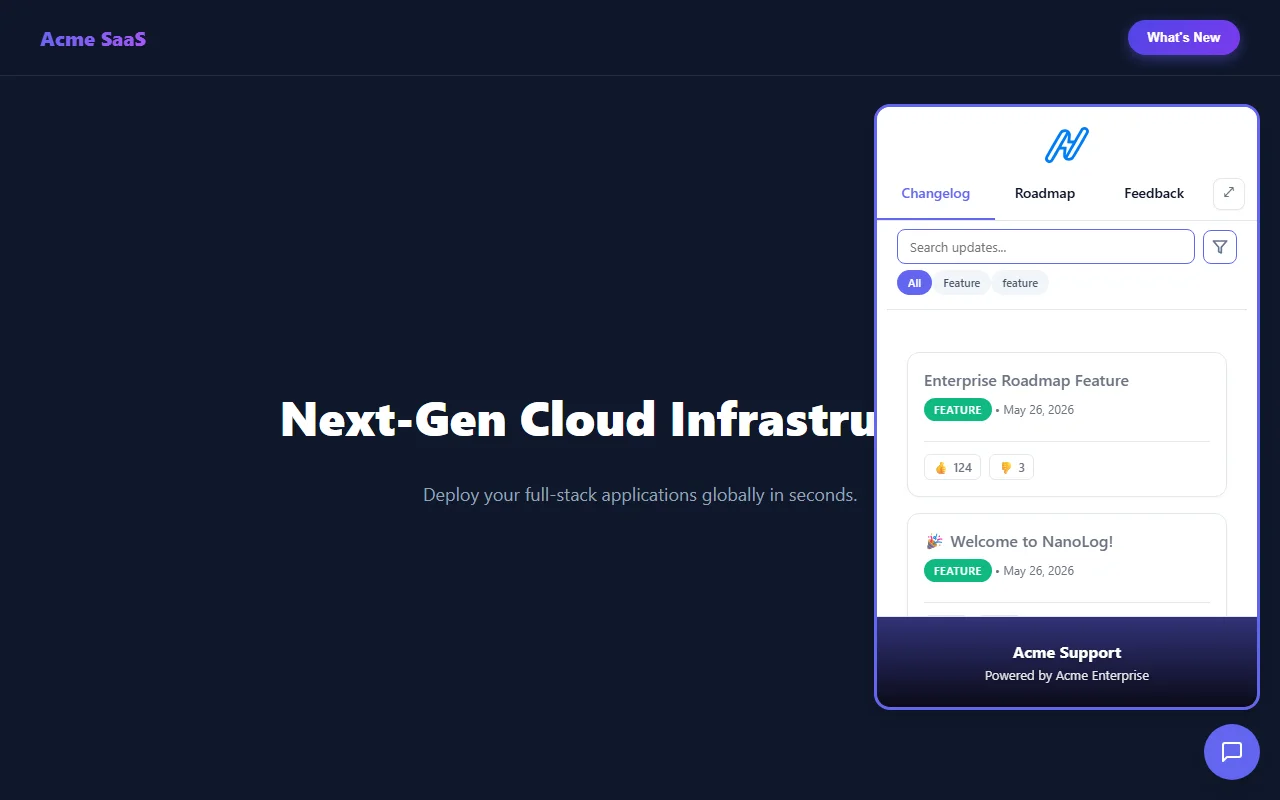
A custom dark-mode "What's New" button trigger integrated seamlessly into an enterprise landing page.